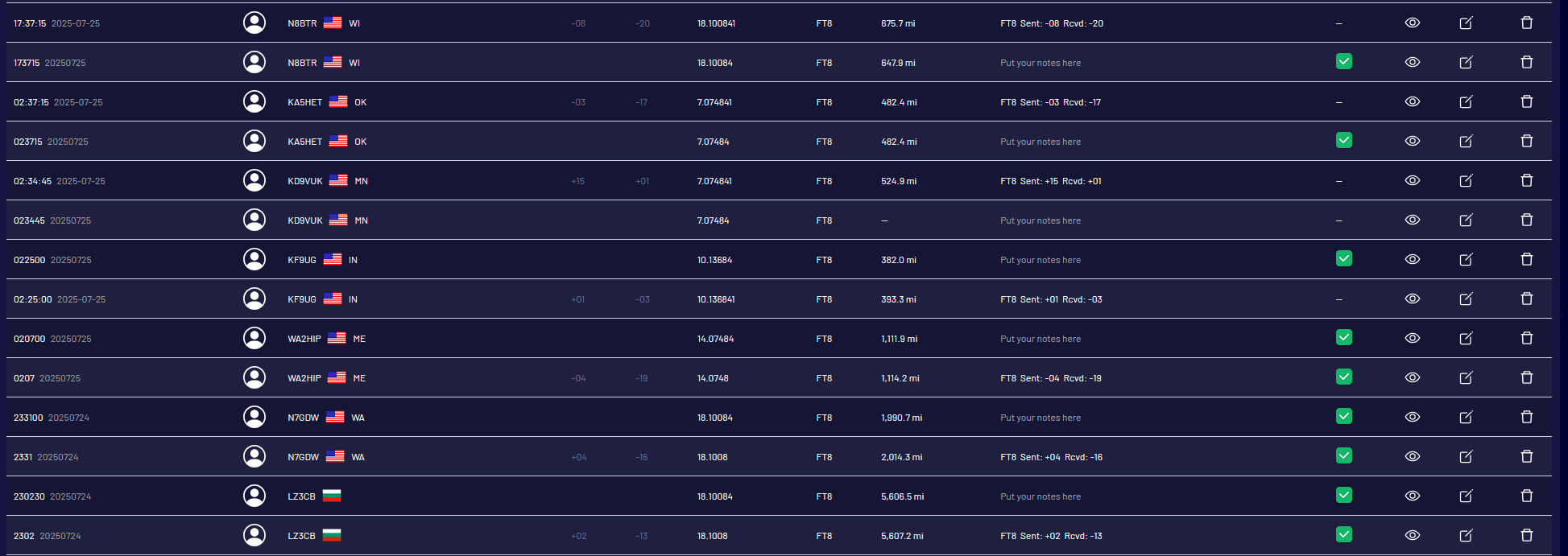
It looks like the import may not being handling a formatting difference for date/time. Unfortunately I don’t know which of the two imports caused the duplication.
This should not be happening, im wondering if its because one has RST information and the other doesn’t and the frequency is off by a digit. Will you go into WRL and click the bug report button and submit a bug report. I’ll reply with this screenshot. That way we have a ticket for it and we can address it properly.
Hey there! New user here. This same thing just happened to me. Imported qsos from qrz.com, then also from LoTW. It duplicated everything. It’s important to mention, that all my LoTW entries are directly uploaded from qrz.com, so there should be no difference.
@HA1RY You’ll need to create a bug report via WRL. Go into WRL and click the ‘Report a bug’ and then i’ll reach out through the ticket and we’ll start to dig into it.
I know this thread is a bit dated but felt it was related…
I originally uploaded my main log via an .adi file but never enabled any type of sync. The file came from my main log in AC Log which sync’s to LOTW, QRZ, and eQSL. All indicate the same number of QSO’s.
Yesterday I decided I wanted to update my WRL log with the additions since the initial upload so I enabled sync with LOTW and clicked on download. I finished but I now have 8 more QSOs indicated in WRL then my other logs.
I was going to delete the WRL log and re-upload via .adi, then allow sync to take it from there, thinking that the incremental upload/sync caused an issue. Before I do that, is there a way to see where the extra QSOs are coming from?
Unfortunately no not really. It’s most like that those 8 extra qso’s are duplicates with some data missing or slightly different from the original ADIF import (ie date/time, mode, grid, etc). It would be a little tedious but I guess you could use the QSO manager, enable all the columns via the columns button and then scroll through the list looking for the same callsign one after another and/or if there are two of the same callsign, one with a confirmation and one without.
Outside of that, there’s not really any way im aware of to know which 8 qso’s are extra.
@K4IDB we don’t pull in confirmations from ADIF files, you can use the QRZ import integration and when it imports the QSOs initially it will bring in the current confirmations from your QRZ logbook as well
This appears to only import new QSO’s and confirmations to a log which already exists?
I tried to import to a blank log, but it would not, I then imported my QRZ QSOs to an existing log and it not only imported the confirmations, but it also brought in 10 extra QSOs. These are duplicates because my ADIF count matches my QRZ log. This is the same issue that occurred when creating the log with a LOTW import.
I also noticed my LOTW confirmations didn’t come down with the QRZ import, they are listed in the QRZ database, so I assume the only way to get LOTW confirmation is once again, with an upgrade?
I’m trying to fully compare my current logging to WRL before entertaining an upgrade.
I think there is a miscommunication here (most likely on my part). Since we dont import duplicates, if you already have the QSO’s in your account (either from an ADIF or from the import integrations (QRZ/LOTW)) then if you try to import a QSO any way, ie ADIF, QRZ/LOTW and its a duplicate we wont import it.
You mentioned previously that you had deleted the logs so I assumed you were starting fresh. If that’s the case then using the QRZ import integration you can import all of your QSO’s from QRZ and it will bring in the confirmations. If you enable the QRZ integration it will only bring in QRZ QSO’s and confirmations and not LOTW as they are two separate services.
If you have some confirmations that are only LOTW but the QSO’s are in both QRZ and LOTW and you use the QRZ import integration to import those QSO’s into your logbook then yes it will not bring in the LOTW confirmations and if you enable LOTW import it wont import those QSO’s because you already have them in your account.
In this specific use case then yes you would need a membership to pull in those confirmations.
@K4IDB This seems to be a rare use case where some contacts are only confirmed on LOTW instead of on both QRZ and LOTW. Your logs would be complete as the QSO records are in your logbook, but in this specific case some confirmations may not be. Certain features are paid features as they cost computing power on our end.
Yes, the desktop app will work offline and keep your logs available so they can be exported by ADIF. The current version of the desktop app is still VERY beta though.